
A Google Ads audit tool is an indispensable part of any advertiser’s toolkit, built to find and plug the financial leaks in your account. Most advertisers are running campaigns with holes in their budget, silently draining money through poor targeting, broken tracking, and flawed account structures. This post covers the audit itself, in the order we run it; the PPC audit checklist is the platform-neutral version and the 10 best PPC audit tools compares the software. An audit stops the guesswork and starts the repair work, turning a potential money pit into a high-performance marketing engine.
Why Your Google Ads Account Is Leaking Money
Imagine pouring thousands into Google Ads only to realize a huge chunk of it has vanished without a trace. This isn't some far-fetched scenario; it’s the reality for many unaudited accounts.
Years of PPC audit data show just how bad it can get. Poorly structured accounts often see their impression share drop by up to 30%, while wasting an average of 26% of their total ad spend on clicks that never had a chance of converting. These aren't just numbers—they're documented findings from comprehensive audits like this one from Optmyzr.
The leaks are almost always silent and nearly impossible to spot without a systematic approach. They hide in plain sight, masked by vanity metrics that look acceptable on the surface but conceal deep-seated inefficiencies.
The Most Common Budget Drains
More often than not, the biggest culprits are basic structural issues and targeting that’s far too vague. For instance, a disorganized account usually has ad groups with overlapping keywords, which forces you to bid against yourself and artificially inflates your cost-per-click (CPC).
Vague targeting is another major cash drain. Relying on broad match keywords without a solid negative keyword list is like trying to fish with a giant net in the open ocean. You might catch something valuable, but you’ll also haul in tons of expensive, irrelevant clicks that do nothing for your bottom line.
Understanding where your strategy stands in the broader paid media ecosystem can also highlight areas for improvement, like in this comparison of Facebook Ads Vs Google Ads.
Shifting from Running Ads to Managing Performance
This is exactly why a google ads audit tool is so critical. It’s not a luxury—it’s a foundational piece of managing a true performance marketing machine. Regular audits are the tune-ups that ensure every part of your strategy works toward one goal: maximizing your return on investment (ROI).
It all comes down to a mindset shift from simply "running ads" to actively "managing performance." This proactive approach involves:
- Continuously questioning your account structure and whether it aligns with your business goals.
- Validating that your tracking and attribution data is actually accurate and trustworthy.
- Ensuring your ad copy and landing pages deliver a seamless, relevant user experience.
By treating your Google Ads account like a finely tuned engine, regular audits become your most critical maintenance check. They prevent small issues from becoming catastrophic failures that drain your budget and derail your growth.
The table below breaks down the most frequent places we see accounts losing money and the real financial impact of these failures. This gives you a data-backed look at exactly where your ad spend might be going to waste and the opportunities you can seize.
Common Google Ads Budget Leaks and Their Financial Impact
This table summarizes the critical areas where ad accounts typically lose money, highlighting the potential financial drain and the opportunity for recovery through a proper audit.
| Audit Area | Common Failure | Average Wasted Spend / Impact |
|---|---|---|
| Account Structure | Keyword cannibalization across campaigns | 10-15% increase in CPC |
| Keyword Targeting | Over-reliance on broad match without negatives | 20-40% of budget on irrelevant clicks |
| Conversion Tracking | Duplicate or broken conversion tags | Skewed CPA by 50% or more |
| Ad Creative | Low Ad Relevance or Quality Score | CPC can increase by up to 400% |
| Landing Page | Mismatch between ad promise and page content | High bounce rates and wasted ad clicks |
As you can see, these aren't minor issues. They represent significant financial losses that compound over time, but the good news is that they are all fixable with a structured and thorough audit process.
Setting the Stage for a Successful Audit
Diving into a Google Ads audit without a game plan is a recipe for disaster. You’ll find yourself drowning in data, chasing down rabbit holes, and completely missing the critical issues that are bleeding your budget dry. The best audits don't just happen; they start with smart preparation, turning a reactive task into a strategic power play.
This isn’t just about finding what’s broken. It's about ensuring your campaigns are actually doing what they’re supposed to—driving real business growth.
Get Your Logins Ready
Before you even think about analyzing a campaign, you need to get your hands on the right access. A proper conversion audit looks at the entire user journey, and that story starts long before Google Ads and ends long after. Without the full picture, you're flying blind.
Make sure you have at least read-only access to these three platforms:
- Google Ads: This one’s a given. You need to get inside the account to see the campaign structures, ad groups, and all the settings.
- Google Analytics (GA4): This is where you connect the dots after the click. Getting into GA4 is non-negotiable for understanding how users behave on your site and where they drop off.
- Google Tag Manager (GTM): Think of GTM as the central nervous system for your website's tracking. You need access to see how your pixels and conversion tags are actually wired up.
Getting these credentials sorted out first saves you from frustrating delays and lets you follow the data from start to finish without hitting a wall.
Know What You're Looking For
An audit without clear goals is just a fishing expedition. Are you trying to slash your Cost Per Acquisition (CPA), bring in better leads, or boost your Return On Ad Spend (ROAS)? Your answer will determine exactly where you focus your time and energy.
Start by asking the right questions to define what a "win" actually looks like:
- What's the main goal here? Is it e-commerce sales, lead gen, or brand awareness?
- Which key performance indicators (KPIs) truly move the needle? Ignore the vanity metrics.
- What defines a high-quality lead or customer for this business?
- Are there any known problems or red flags? Get the inside scoop from the team running the account.
Answering these questions gives your audit a laser-focused purpose. You're not just hunting for random errors; you're diagnosing why the account is falling short of its strategic goals.
A great way to stay organized is to use a structured Google Ads audit template. It provides a solid framework to make sure you cover all your bases and align your findings with your objectives.
Map Out the Entire Tech Stack
Finally, you need a complete picture of the marketing tech stack. Google Ads data doesn't live in a bubble—it's connected to a whole ecosystem of tools that can impact your tracking and data integrity.
Think about the entire data journey. A user clicks an ad, lands on the site, and submits a form. Where does that lead data go next? Is it pushed into a CRM like Salesforce or HubSpot? Is server-side tagging in play, which could hide what you see in client-side tools?
A modern Google Ads audit goes way beyond the ad platform itself. You have to investigate the entire chain of events to spot where data might be breaking down—whether it's a busted pixel on the site or a bad CRM integration. This groundwork is what separates a surface-level check-up from a truly game-changing audit.
Alright, you've done the prep work. Now it's time to roll up your sleeves and dive into the data. We're moving from planning to the actual investigation, where we'll systematically pick apart your campaigns, ad groups, and keyword strategy to find the hidden money pits.
But before we even get to keywords, we need to talk about the real silent killer of ROI: broken tracking.
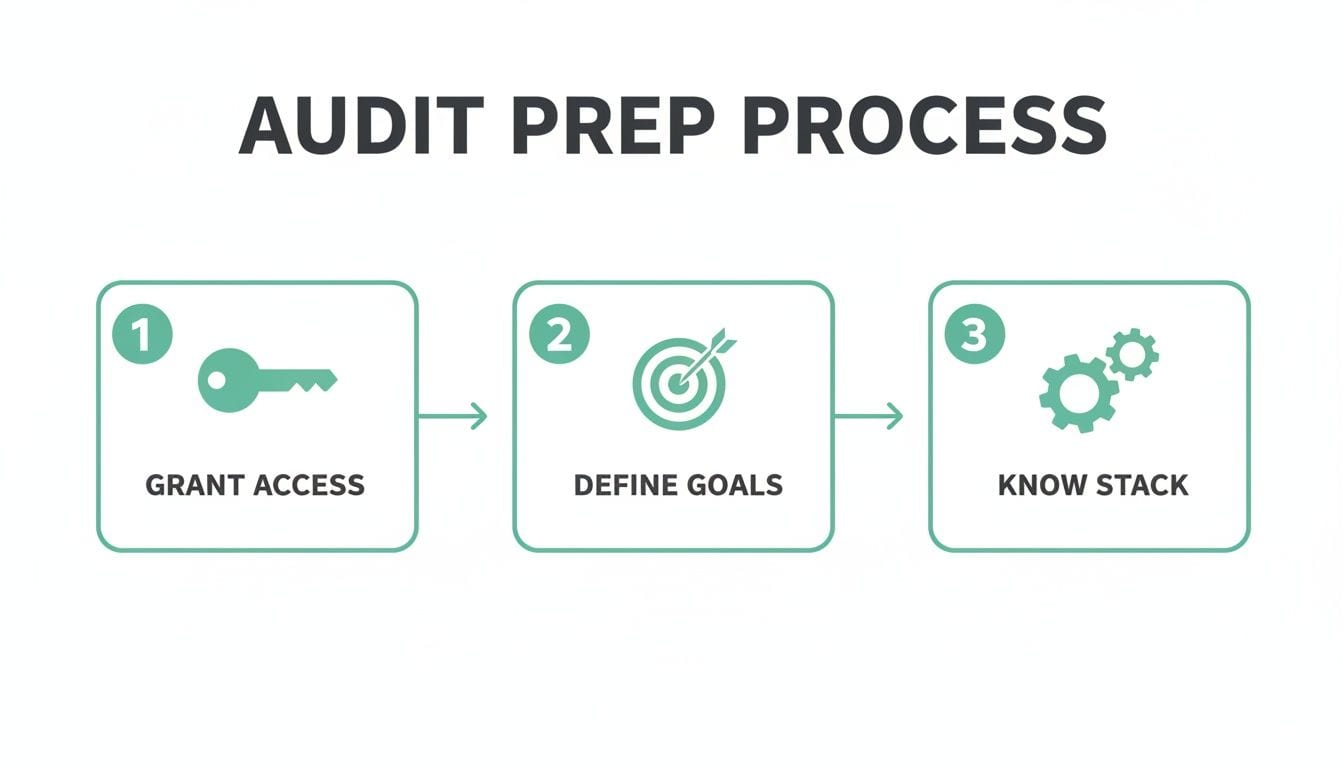
Those foundational steps—getting access, setting goals, and knowing your tech—are what make this next phase possible. With that solid base, we can start the real analysis with confidence.
Uncovering Keyword Cannibalization and Budget Bleed
One of the most common—and costly—mistakes I see is keyword cannibalization. This is what happens when different campaigns or ad groups are all chasing the same keywords, effectively forcing you to bid against yourself. The end result is always the same: inflated CPCs and wasted spend.
Start by exporting your keyword lists. Look for duplicates across campaigns that are trying to achieve similar goals. You need to be especially wary of broad match keywords. If you don't have a rock-solid negative keyword list, broad match can trigger your ads for completely irrelevant searches, bleeding your budget dry one pointless click at a time. A quick scan of your Search Terms Report will show you exactly how much you might be spending on traffic that has zero chance of converting.
The Hidden ROI Killer: Broken UTM Tracking
Even if your campaign structure is flawless, it's all for nothing if you can't track what's working. This is where Urchin Tracking Module (UTM) parameters are supposed to shine, but they're a frequent point of failure. Inconsistent or missing UTM tags create attribution black holes in your analytics, making it impossible to know which campaigns are actually driving results.
Audits regularly show that 20-30% of Google Ads budgets are lost to fixable issues like gaps in negative keywords. It gets worse. Automated reports from tools like Marketing Auditor have found UTM errors in 35% of accounts, which leads to attribution gaps that misreport about 18% of traffic. You can see more of these findings on Ignite Digital's resource page to understand just how common this is.
Your data is only as good as your tagging. A single mistyped UTM parameter in a high-spend campaign can make thousands of dollars in ad spend vanish from your attribution reports, leading to terrible optimization decisions.
To fight this, you need a standardized UTM policy that the entire team follows. Creating a clear framework removes the guesswork and is the first step toward data you can actually trust. We've built a great framework you can use in our detailed Google Ads tracking template guide.
Creating a Standardized UTM Policy
A solid UTM policy is your best defense against messy data. It doesn't have to be complicated, but it absolutely must be consistent. Here’s a simple framework to get you started:
utm_source: The platform sending traffic (e.g.,google,facebook).utm_medium: The marketing channel (e.g.,cpc,social,email).utm_campaign: The specific campaign name (e.g.,q4-black-friday-sale-2026).utm_term: The paid keyword, which Google Ads can often populate dynamically.utm_content: Used to tell ads apart within the same campaign (e.g.,video-ad-a,image-ad-b).
Document this policy and put it somewhere everyone who builds campaigns can easily find it. Consistency here is what separates clean, reliable attribution from a data nightmare.
Of course, manually checking every single link is a recipe for mistakes and wasted time. This is where a modern google ads audit tool becomes a complete game-changer. An observability platform like Trackingplan automatically scans every campaign URL in real-time, instantly flagging any links with broken, missing, or non-compliant UTMs. This frees your team from the mind-numbing manual work and ensures every dollar you spend is tracked accurately from click to conversion.
Verifying Your Conversion Tracking and Pixels
We’ve covered campaign structures and UTMs, but now we get to the heart of any serious Google Ads audit: conversion tracking. If your conversion data is off, every decision you make—from budget allocation to your bidding strategy—is built on a house of cards. The most important question you have to ask is, are your numbers even real?
Verifying your pixels and conversion tags is not just another item on a checklist. It's the single most critical step in proving your entire advertising effort is worthwhile. This goes way beyond just checking if a tag exists on a page.
Confirming Your Google Tag Is Firing
First things first: you need to confirm that your Google Tag is active on all the key pages in your user journey. This obviously starts with your landing pages, but it all leads to the most important page of all—the post-conversion or 'thank you' page. If the tag is missing here, you've created a massive blind spot, making it impossible to know how your campaigns are truly performing.
You can do a quick spot-check using a browser extension like Google's Tag Assistant. Just navigate to a landing page and walk through the conversion process yourself. Watch to see if the correct conversion tag fires—and just as crucially, that it only fires once.
This simple test often uncovers some pretty serious issues. Sometimes a tag is missing entirely, but a more sinister problem is often lurking in the code.
The Danger of Duplicate Conversions
One of the most common and destructive flaws we see is duplicate conversions. This happens when a single user action, like one purchase or one form submission, gets recorded multiple times. The result is dangerously inflated performance data that makes you think you're hitting home runs when you're barely on base.
Imagine your report shows 100 conversions at a $50 Cost Per Acquisition (CPA). But if half of those are duplicates, your real CPA is actually $100. This bad data will trick you into scaling up what looks like a winning campaign, when you’re actually just doubling down on an underperformer and burning cash on phantom results.
Auditing for duplicate conversions is non-negotiable. Inflated metrics can mislead your optimization efforts for months, causing you to invest heavily in strategies that are only successful on paper.
An effective google ads audit tool has to be able to catch this. Manual checks can spot duplicates, but they only give you a snapshot in time. An automated system is what you need to monitor these events continuously.
The Critical Link to Quality Score
Beyond just the technical tag verification, your audit absolutely must scrutinize the connection between your ads and your landing pages. This relationship directly fuels your Quality Score, the metric Google uses to determine your ad rank and how much you pay per click. A high Quality Score can dramatically lower your costs, while a low one will sink your campaigns before they even have a chance.
Did you know that a high Quality Score can slash your CPC by up to 400% compared to a low one? It’s true. Yet so many accounts languish with scores below 5/10 simply because their landing pages feel like an afterthought. Ad Relevance, Expected CTR, and Landing Page Experience are the three pillars of this score, and mismatches here are a primary reason why over 62% of campaigns underperform. You can explore more data on this topic to see its full impact on your account's health.
A classic failure is a total disconnect between your ad copy and the landing page. If your ad screams "50% Off Sale" but the landing page barely whispers it, users will bounce. That sends a terrible signal to Google, torpedoing your score and driving up your costs.
Your Automated Safety Net
This is where a marketing observability platform like Trackingplan becomes your essential safety net. A manual audit might happen quarterly, but code deployments happen weekly, sometimes even daily. A developer could accidentally push an update that breaks your dataLayer or removes a critical pixel, and you might not catch that failure for months.
By then, the damage is done. You've lost invaluable data and potentially wasted thousands in ad spend. An automated solution acts as a 24/7 google ads audit tool, continuously monitoring your pixels and dataLayer events across every page. The moment a deployment breaks your tracking, you get an instant alert with the root cause. Instead of discovering a problem three months too late, you can fix it before it does any real harm.
Auditing Performance Max and long funnels
Performance Max and long B2B buying cycles break simple audit frameworks.
A basic account review might catch obvious waste, but it won’t tell you whether the system has the right inputs, whether the funnel stages are valued correctly, or whether consent and cross-device behavior are distorting the story.
Auditing PMax means auditing the inputs, not only the output
With Performance Max, weak inputs explain disappointing results.
That means checking asset groups, search themes, audience signals, feed quality where relevant, and the conversion actions feeding the model. If the campaign is underfed, poorly grouped, or pointed at noisy events, performance issues aren’t surprising.
The review should ask:
- Are asset groups built around product or service themes?
- Are the supplied signals specific enough to guide learning?
- Are the conversion actions aligned to value?
- Does reporting suggest the campaign is finding qualified intent or only available inventory?
PMax also tends to expose hidden implementation issues faster because it leans heavily on the conversion data you give it.
B2B funnels need a value map, not one conversion goal
A complex funnel includes multiple moments that matter. A gated asset download. A qualified lead. A booked demo. A closed opportunity.
The audit has to distinguish them clearly.
If every step is counted as an equal success, bidding can overweight the top of funnel. If only the final step is counted, the platform may not get enough learning signal. The answer isn’t a universal template. It’s a value model that reflects how your sales process works.
It helps to step back and review whether campaign goals match pipeline reality rather than only in-platform conversion volume.
Consent and cross-device behavior make B2B audits harder
This is one of the biggest reasons manual audits miss what matters in B2B environments.
According to AdConversion, with GA4 enhanced consent signals fully rolled out in 2025, manual audits fail to validate real-time pixel firing, and 22% of B2B campaigns show tagging drift: https://www.adconversion.com/blog/google-ads-audit
That drift can show up as partial attribution, missing events from specific journeys, or reporting shifts after implementation changes that nobody connected back to consent or tag behavior.
In B2B, the cleanest-looking dashboard is sometimes the least trustworthy one, because the buying journey spans devices, sessions, and systems.
A useful advanced audit checks not only the ad account but also how the website, CRM handoff, analytics platform, and consent setup work together.
What to look at when the funnel is long
For complex accounts, I’d prioritize this order:
- Value assignment: Make sure the platform can distinguish low-intent and sales-relevant outcomes.
- Stage alignment: Check whether imported conversions reflect funnel progression.
- Cross-device clues: Compare journeys across analytics, CRM, and ad platform reporting rather than trusting one view.
- Consent-sensitive paths: Test key flows under realistic conditions, not only in ideal internal QA environments.
That kind of audit takes longer than a free scan. It also answers better questions.
Common tracking problems an audit finds
Running an audit tool and finding a problem is just the start. The real win comes when you fix the issue, stop wasting money, and get your data straight. Let's dig into some of the most frequent tracking headaches I see and how to get them sorted out.
These aren't just hypotheticals. They’re expensive, real-world issues that automated tools are built to sniff out, helping you get to a solution much faster than you could on your own.
Broken Conversion Pixels After a Site Update
This is a classic. The dev team rolls out a website update, and your conversion tracking just flatlines. Your campaigns suddenly look like they're tanking, but the truth is, the pixels simply stopped firing.
- What It Looks Like: You'll see a sudden, stomach-dropping fall in conversions in your Google or Meta dashboards, even though your clicks and ad spend are holding steady. Over in GA4, you can see traffic hitting the confirmation page, but there are no matching
purchaseevents to be found. - How to Fix It: The old-school way involves digging through browser developer tools and tag assistants to inspect the network requests on your thank-you page. But with an audit tool that watches the hits, you get an immediate alert that a pixel is missing or broken. It shows you the exact page, saving you hours of frantic guesswork.
Misconfigured Attribution in GA4
You're celebrating what looks like a wildly successful Meta Ads campaign, but when you check GA4, it's giving all the credit to 'Direct' traffic. This kind of attribution mismatch happens all the time and leads to some seriously flawed budget decisions.
Misaligned attribution is like having two different scorekeepers for the same game. You can’t declare a winner because you have two conflicting versions of the truth, leaving you to guess which channel truly drove the conversion.
This often happens because GA4 might be on a last-click model while your ad platforms are using a more complex, data-driven approach. The fix is to align these models where possible, but more importantly, you have to get your UTM parameters absolutely perfect so GA4 can correctly attribute the session data in the first place.
Rogue Marketing Tags Firing Without Consent
One of the sneakiest—and most dangerous—problems is a marketing tag firing before a user actually gives their consent. This can happen if a tag was hardcoded directly onto the site or misconfigured in Google Tag Manager, creating a major privacy compliance headache.
- What It Looks Like: You won't spot this in your standard analytics reports. This kind of issue usually surfaces during a deep technical audit or, worse, when a privacy-conscious user complains.
- How to Fix It: A monitoring tool can watch the network requests and cross-reference them with your consent management platform (CMP). It will automatically flag any tag that fires before or against a user’s consent choice, giving you a clear, actionable trail to show developers exactly which script needs to be reined in.
Frequently asked questions
What can a free Google Ads audit tell me?
A free tool is useful for quick diagnosis.
It can flag obvious issues in campaign setup, ad strength, impression share constraints, keyword hygiene, and high-level efficiency. That makes it good for a first pass, a second opinion, or a fast review when you inherit an account.
It will not validate your full tracking implementation, your data layer behavior, or downstream attribution quality with the depth needed for serious troubleshooting.
How often should I audit a Google Ads account?
For account structure, search terms, budgets, and settings, regular manual review makes sense.
For tracking integrity, release-heavy websites and multi-team environments need ongoing checks because the data layer can change between formal audits. If your business depends on paid acquisition, the modern standard is a mix of scheduled review plus continuous monitoring.
Can I do an audit without admin access?
Partly, yes.
With marketer-level access to Google Ads and analytics, you can review campaign structure, search terms, conversion settings, naming, and reporting patterns. To properly test tags, triggers, data layer pushes, and consent behavior, you will need help from whoever manages GTM, site code, or analytics implementation.
The practical challenge isn’t access alone. It’s coordination between media, analytics, and engineering.
What’s the most important part of the audit?
Tracking accuracy.
If you can’t trust the conversion signals, you can’t trust the optimization logic built on them. Structural cleanup matters. Search term control matters. Bidding strategy matters. But bad measurement can make a well-managed account look worse or a weak account look healthy.
Should I pause campaigns while auditing?
Generally, no.
Audit live behavior whenever possible. Live testing shows how tags fire, how UTMs persist, and how the account behaves under real conditions. The exception is a critical failure, such as a broken landing page, clearly invalid conversion counting, or severe targeting leakage that’s actively wasting spend.
What’s the difference between a manual audit and automated monitoring?
They solve different problems.
A manual audit is better for diagnosis, prioritization, and strategic decisions. Automated monitoring is better for catching implementation drift, broken pixels, event mismatches, and tagging issues that happen after the audit is done.
The strongest setup uses both.
If your team is spending real money in Google Ads, the smartest next step isn’t another prettier dashboard. It’s making sure the data behind your bidding, attribution, and reporting is dependable every day. Trackingplan helps teams monitor analytics and marketing tracking automatically so broken pixels, UTM errors, schema drift, and consent issues don’t sit unnoticed while campaigns keep spending.
Automating Your Audit with Continuous Monitoring
Let's be honest: even the most meticulous manual audit has a fatal flaw. It’s a snapshot in time. The second you check that final box and close your spreadsheet, the data is already aging. One small code change, a hiccup from a third-party tool, or simple human error can wreck all that careful work, and you might not have a clue for weeks.
That’s why so many of us have moved away from periodic fire drills and toward proactive, continuous monitoring. Instead of just looking for problems every quarter, we have systems in place that act like a 24/7 google ads audit tool, flagging issues the moment they pop up.
From Snapshot Audits to Real-Time Observability
Think about a classic, gut-wrenching scenario we've all lived through. A developer ships a seemingly small update on a Friday afternoon. Except this time, it accidentally breaks the dataLayer on your checkout confirmation page, completely silencing your purchase event.
Your manual audit, scheduled for the end of the month, won't catch this for weeks. By the time you notice, you've torched thousands of dollars in ad spend because Google's smart bidding algorithms have been making decisions based on garbage data.
This is precisely the kind of disaster an automated observability platform like Trackingplan is built to prevent. It would have spotted that dataLayer anomaly within minutes of the code push. Your team would get an instant alert on Slack or via email, turning a potential month-long data catastrophe into a quick fix.
And these aren't just vague "something is broken" warnings. The alert points you straight to the problem: the specific page (/checkout-confirmation) and the exact event (purchase) that's failing. It turns a chaotic, all-hands-on-deck fire drill into a precise, targeted fix that gets resolved in hours, not weeks.
A Single Source of Truth for Your Entire Stack
The real magic here goes way beyond just Google Ads. A genuinely useful google ads audit tool knows that ad performance is tied into a whole web of marketing tech. Data flows from your ad platforms, through tag managers, into analytics tools, and then out to CRMs and data warehouses.
An observability platform automatically discovers and validates this entire ecosystem. It becomes your single source of truth by watching every connection—from your Google Ads pixels and Segment calls to your GA4 events and Facebook CAPI requests.
This gives you a few massive advantages:
- Complete Visibility: You get a complete map of your marketing stack, showing you exactly how data flows from one platform to the next.
- Proactive Validation: The system is always checking for schema mismatches, broken pixels, and missing properties across every tool, not just Google Ads.
- Cross-Team Alignment: Marketers, developers, and analysts are all looking at the same, verified data. No more confusion or finger-pointing.
This isn't just about getting a fancier tool. It's about fundamentally changing how you approach data integrity. You go from a state of constant, low-level anxiety to one of confident control, knowing your data is solid around the clock.
This proactive mindset is a cornerstone of modern data management. If you want to dive deeper into building this kind of resilient data culture, our automated marketing observability guide is a great place to start.
With continuous monitoring, the audit is never really "finished." It becomes an always-on process that protects your data, defends your ad spend, and lets your team make decisions based on numbers they can actually trust. It’s the difference between reacting to last month’s problems and getting ahead of tomorrow’s opportunities.
Even with the best guide, a few questions always pop up when you're deep in the trenches of a Google Ads audit. It's a complex beast, after all.
Let's walk through some of the most common questions I hear from advertisers. Getting these answers straight will change how you approach your audits and, more importantly, the results you get.
How Often Should I Audit My Google Ads Account?
This is always the first question, and the honest answer depends on your ad spend and how complex your account is. The standard advice is to base your audit schedule on your budget.
For accounts spending over $10,000 a month, a quick weekly health check and a full, deep-dive audit every quarter is a solid rhythm. If you're spending less, a monthly check-in with a thorough audit every six months usually feels right.
But there’s a massive flaw in that old-school, reactive schedule. It completely ignores things that break suddenly. If a developer pushes new code and accidentally breaks your conversion pixel, a quarterly audit means you might not notice for weeks—or even months. By that point, the damage is done. You've burned a huge chunk of your budget on bad data.
This is exactly why continuous automated monitoring is the only way to go. A google ads audit tool like Trackingplan audits your account 24/7. It flags critical errors—like broken tracking or mangled UTMs—the second they happen, protecting your data and your budget, no matter when your next manual review is scheduled.
This completely flips the script. You move from a reactive, "what went wrong last quarter?" mindset to a proactive, real-time, "what's breaking right now?" approach. It's a far more effective way to protect your ROI.
What Is the Difference Between a Manual Audit and an Automated Tool?
Thinking about this difference is the first step to modernizing your entire audit process. A manual audit is just a snapshot—a picture of your account's health at one specific moment in time. It's a person, following a checklist, for hours or even days. The second that report is done, it's already going out of date.
An automated observability platform, on the other hand, is like having a team of analysts auditing your account around the clock. Here's how they really stack up:
- Discovery: In a manual audit, you're responsible for finding everything. An automated tool discovers your entire marketing and analytics stack for you—every Google Tag, every Segment event—and maps it all out.
- Monitoring: Manual audits are periodic appointments on your calendar. Automated monitoring is relentless. It's always watching for broken pixels, unexpected schema changes, or campaign tagging errors.
- Alerting: When you audit manually, you are the one searching for problems. With an automated tool, the platform alerts you the moment something breaks, often pointing you directly to the root cause for a quick fix.
In short, an automated tool turns a tedious, reactive chore into a powerful, proactive process. It lets you stop hunting for problems and start focusing on strategy.
What Are the First Three Things I Should Check in My Audit?
If you're feeling swamped and just need a place to start, focus on the areas that deliver the biggest and fastest wins. Fixing these three things can often uncover serious budget waste right off the bat.
-
Find Budget-Draining Search Terms: Go directly to your Search Terms Report in Google Ads. This shows you the actual queries that triggered your ads. Hunt for completely irrelevant terms that are just eating your budget and add them to your negative keywords list. This is the quickest way to stop wasting money, period.
-
Verify Your Primary Conversion Action: You have to know if your main conversion action is tracking correctly. Use a tool like Google Tag Assistant, or better yet, run a real test yourself. Make a purchase or fill out the form. You're checking for two things: Is the tag firing at all? And is it firing only once? Double-counting is a rampant issue that will dangerously inflate your performance data.
-
Review Your Location Settings: This is such a simple check, but you’d be surprised how often it’s wrong. Go into your campaign settings and make sure you're targeting "Presence: People in or regularly in your targeted locations." The default setting, "Presence or interest," can cause you to pay for clicks from people in countries you don't even serve.
Just these three checks can make a huge difference in your account's efficiency and performance.
Can a Google Ads Audit Tool Fix My Account Automatically?
That’s a common misconception. A google ads audit tool, particularly an observability platform, is built to diagnose problems with incredible speed and accuracy—not to fix them for you. Think of it as your eyes and ears, not your hands.
For example, a platform like Trackingplan will alert you that a specific UTM parameter is missing from a high-spend campaign or that your purchase event stopped firing on the confirmation page. But it’s still on you or a developer to log into Google Ads and add the right tag, or to fix the broken event in the website's code.
The real power of a tool like this is in its ability to instantly tell you what is broken and exactly where to look. This cuts out countless hours of manual digging and lets you fix critical issues before they waste thousands in ad spend or corrupt your data.
Ready to move beyond manual spot-checks and ensure your Google Ads data is always accurate? Trackingplan provides the continuous, automated monitoring you need to protect your ad spend and make decisions with confidence. Discover how it can transform your analytics QA today.