
What Is The Meta Pixel Helper
At its core, the Meta Pixel Helper is the go-to diagnostic tool for anyone advertising on Meta's platforms. It's a simple browser add-on that scans the websites you visit for Meta Pixel code.
When it finds a pixel, a small pop-up window in your browser tells you if it's working properly and flags any issues it detects. This immediate feedback is crucial for confirming that key user actions—like adding an item to a cart or completing a purchase—are being recorded exactly as they should be.
Without a tool like this, you're essentially flying blind, just hoping your ad spend is being optimized with accurate data. The helper solves this by giving you instant validation. You can click through your site just like a customer and see which pixel events fire on each page, confirming your setup aligns with your marketing goals.
Why Pixel Health Matters
A healthy, correctly implemented pixel is the foundation of any successful Meta advertising strategy. The data it collects powers everything from campaign optimization and building retargeting audiences to measuring your return on ad spend (ROAS).
Even a small error can cause big problems:
- Inaccurate Reporting: If purchase events don't fire, your campaign performance will look much worse than it really is.
- Wasted Ad Spend: Without reliable data, Meta's algorithm can't effectively find and serve ads to the people most likely to convert.
- Flawed Audience Building: If you're missing 'AddToCart' events, you can't build effective retargeting audiences for people who abandoned their carts.
The Meta Pixel is a dominant force in digital advertising, used by 16.4% of all websites that use a known traffic analysis tool. This massive adoption, which you can explore on w3techs.com, shows just how many businesses depend on it for precise tracking.
The Pixel Helper is your on-the-spot inspector. It won't catch every subtle, intermittent bug, but it will instantly tell you if the basic wiring is wrong. Using it for every new event setup is a non-negotiable first step in quality assurance.
Before we dive into the "how-to," let's quickly break down what the Pixel Helper actually does.
Meta Pixel Helper At-a-Glance Functions
This table offers a quick summary of what the Meta Pixel Helper is designed to do, so you can immediately grasp its core capabilities and limitations.
In short, the tool is built for manual spot-checks. It’s perfect for verifying a new landing page or double-checking a checkout flow after a site update.
But its manual nature is also its main limitation. As we'll get into later, this presents challenges for businesses that need continuous, automated monitoring. While it's an indispensable starting point, it's not the complete solution for total data confidence.
How to Install and Use the Meta Pixel Helper
Getting the Meta Pixel Helper up and running is a quick, painless process that takes just a few clicks. Think of this free Chrome extension as your first line of defense—an essential tool for verifying that your tracking works exactly as you expect, giving you immediate feedback right in your browser.
Installing the Extension
Your first stop is the Chrome Web Store. Installing the tool is just as simple as adding any other extension you’ve used before.
- Head over to the Chrome Web Store.
- Use the search bar to look for "Meta Pixel Helper." Make sure you grab the official one offered by "Meta."
- Click "Add to Chrome" and then confirm by clicking "Add extension" in the pop-up.
Once it's installed, a small </> icon will appear in your browser's toolbar. If you don't see it right away, click the puzzle piece icon (your extensions menu) and pin the Meta Pixel Helper to your toolbar. Now you're ready to start debugging.
Interpreting the Helper’s Signals
With the extension installed, go to your website. The Meta Pixel Helper icon will light up and show a number, which tells you it’s found at least one pixel on the page. Clicking the icon opens a small diagnostic window revealing every pixel event that has fired.
The signals are color-coded for fast, at-a-glance analysis:
- Green: All good! This means an event fired correctly without any obvious implementation errors.
- Yellow: A warning. The pixel is working, but there might be a minor issue worth looking into. This could be a pixel loading slowly or a non-standard event name. It's not a critical failure, but you should still investigate.
- Red: An error. This is a red flag for a serious problem, like an invalid Pixel ID or a crucial parameter missing from an event. This is what's actively breaking your tracking.
This instant feedback loop is absolutely invaluable for on-the-spot checks and quick troubleshooting.
A Practical E-Commerce Walkthrough
Let’s walk through a typical customer journey on an e-commerce site to see the Meta Pixel Helper in action. This is the best way to manually confirm your entire funnel is being tracked.
When a user first lands on a product page, you should immediately see two standard events fire:
PageView: This is the baseline, confirming the pixel code is loading on the page.ViewContent: This tells you a user has viewed a specific product, a critical signal for building retargeting campaigns.
Next, the user hits the "Add to Cart" button. When that happens, a new event should pop up in the helper's window:
AddToCart: This is a huge indicator of purchase intent. If this event doesn't fire, you're missing out on building audiences for cart abandonment campaigns.
As the user moves from the cart to the checkout page, another key event should register:
InitiateCheckout: This signals the user has taken another major step toward converting. It's a different, more qualified audience than those who only added an item to their cart.
Finally, after the user completes their payment and lands on the "Thank You" or confirmation page, the most important event of all should fire:
Purchase: This confirms a successful conversion. The helper will also display the parameters sent with this event, likevalueandcurrency. This is where you can double-check that your revenue is being tracked correctly.
By following this flow, you can manually validate that every step of your conversion funnel is tracked accurately. Each event provides a clear signal, telling you whether your data foundation is solid or if there's a crack that needs fixing.
Solving Common Errors with the Pixel Helper
Spotting a red or yellow icon in the Meta Pixel Helper can feel like a setback, but it’s actually a good thing. It means you’ve caught a problem before it had a chance to poison your ad data or burn through your budget. Think of these alerts not as failures, but as clear, specific instructions on how to strengthen your entire tracking setup.
Understanding what these errors actually mean is the first step toward fixing them quickly. This knowledge is non-negotiable for anyone managing campaigns, since even a tiny hiccup can completely derail your website conversion tracking and lead to seriously unreliable performance data. Let's walk through the most common errors and how to get everything back on track.
Pixel Did Not Load
This is one of the most critical errors you can get because it means zero data is being sent to Meta. If the Pixel Helper shows this, it’s telling you that while it found a code snippet on your page, it couldn't actually fetch and run the pixel's JavaScript file.
The implications here are severe. No events are being tracked—not even a basic PageView. Your ad campaigns are essentially flying blind, with no ability to optimize, retarget, or report on conversions from that page.
Common Causes and Fixes:
- Ad Blockers: This is the culprit 9 times out of 10. Disable any ad-blocking extensions in your browser and reload the page. Make sure your team knows to do this first when troubleshooting.
- Incorrect Code Implementation: A developer might have accidentally tweaked the base pixel code. Your best bet is to compare the code on your website directly with the official snippet from Meta Events Manager to spot any differences.
- Content Security Policy (CSP): Sometimes, a website's own security settings block Meta's scripts from loading. This is a more technical fix, and you'll need your development team to whitelist Meta's domains.
Pixel Activated Multiple Times
When you see this warning, it means the exact same event, with the exact same parameters, was sent to Meta more than once when the page loaded. It might seem harmless, but this duplication can completely skew your metrics.
Imagine a customer makes a single $50 purchase, but the Purchase event fires twice. Your reports will suddenly show two purchases and $100 in revenue, massively inflating your ROAS and tricking you into making poor optimization decisions.
This error is especially dangerous during big sales events. If every single purchase is double-counted, you might mistakenly scale up your ad spend based on artificially high performance, only to be crushed by the real, disappointing results later.
To fix this, you need to play detective and find where the duplicate code is coming from. Most often, the pixel has been installed manually in the site's theme files and again through a plugin or Google Tag Manager. You have to pick one implementation method and get rid of the other to ensure each event fires only once.
When the Meta Pixel Helper Is Not Enough
The Meta Pixel Helper is a fantastic tool for on-the-spot debugging. I use it all the time for a quick, real-time snapshot of what's happening in my browser. But—and this is a big but—relying on it as your only way to guarantee data quality is like having a security guard who only watches one door of a massive building. You're going to miss things.
While it's great for manual checks, its very nature creates some critical blind spots. Modern businesses run 24/7, serving customers through countless different journeys. A manual, point-in-time tool just can't keep up. The helper only shows you what's happening on your screen, right now, leaving you completely exposed to intermittent bugs, user-specific issues, and the kind of silent data loss that can happen at any moment.
Why Pixel Helpers Fail
The root of the problem is that the Meta Pixel Helper is a reactive tool in a world that demands proactive monitoring. It only sees what's happening in your browser, at one specific moment in time. It can't possibly give you a complete picture of your data quality across all user sessions, 24/7.
Key limitations include:
- No Scalability: You can't manually check every page, every user journey, and every device all the time. An intermittent bug that only affects mobile users in a specific region will go completely unnoticed.
- Lack of Historical Context: The helper tells you what's broken right now, but it can't tell you when it broke or how much valuable data you've already lost.
- Zero Server-Side Visibility: If you're using the Meta Conversions API for server-side events, the Pixel Helper has absolutely no visibility into that data stream. It’s a total black box.
These limitations highlight a critical gap. Manual spot-checks are reactive. They help you fix problems after they've already happened. For true data confidence, you need a system that prevents issues before they can cause damage.
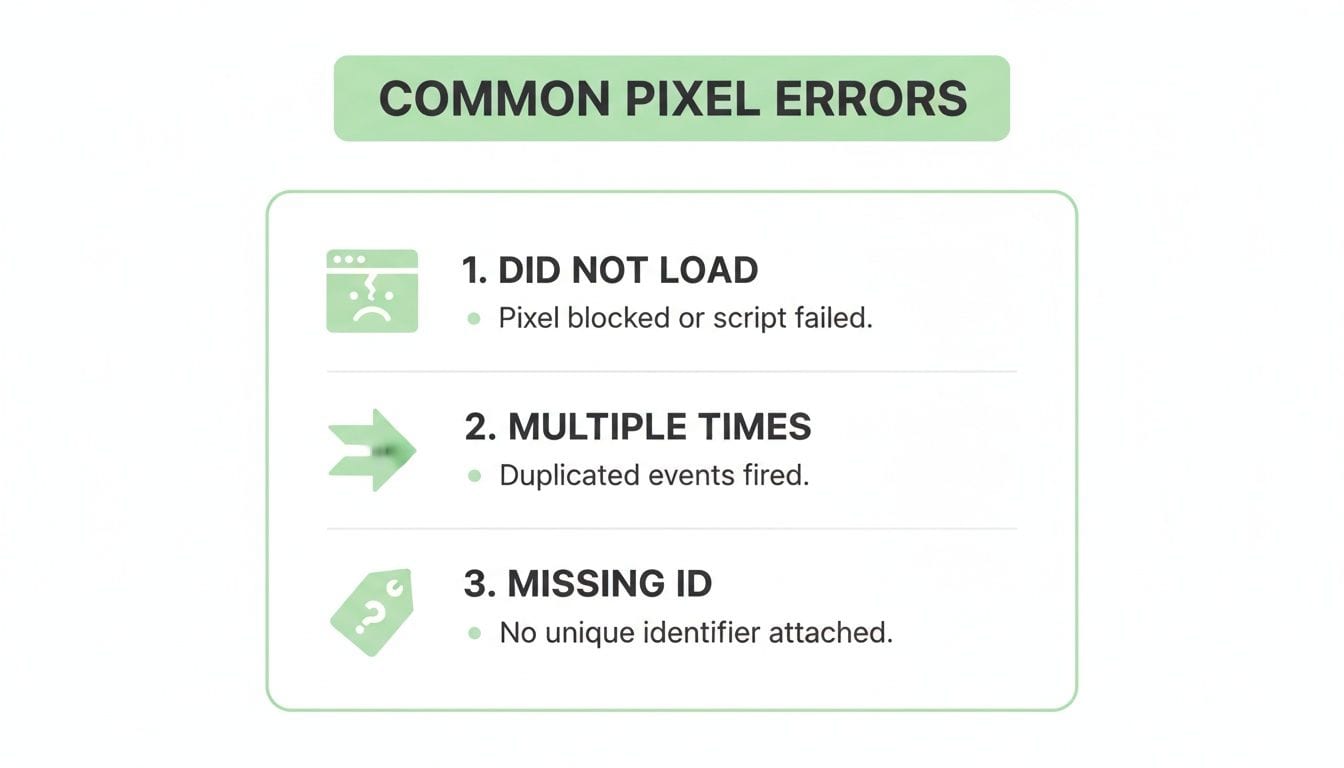
This shows just how easily data can be corrupted, from pixels failing to load entirely to events firing multiple times and wrecking your metrics.
Manual Spot-Checks vs Automated Observability
It's clear that manual checks have their place, but they can't cover all your bases. Here’s a direct comparison showing where the Meta Pixel Helper shines and where an automated platform like Trackingplan is essential for complete data confidence.
Ultimately, while the Helper is a useful diagnostic tool, relying on it alone leaves significant gaps that only automated observability can fill.
Why Trackingplan Is The Best Alternative
This is where an automated observability platform like Trackingplan fundamentally changes the game. It shifts you from a reactive state of hunting for errors to a proactive one where you're alerted the moment something goes wrong. Trackingplan doesn't just spot-check; it monitors 100% of your user traffic in real time.
Instead of you having to manually simulate a purchase to see if the pixel works, Trackingplan validates every single real purchase event from every user, ensuring no data is ever lost.
Trackingplan directly solves the shortcomings of the Meta Pixel Helper by providing:
- Continuous, Automated Monitoring: It’s your 24/7 analytics watchdog, validating every single event, parameter, and user journey against your expected setup.
- Real-Time Alerts: If a developer push accidentally breaks the
AddToCartevent, you get an immediate alert in Slack or email. You don't have to wait for your campaign ROAS to plummet to know there's a problem. - Full Funnel Visibility: It sees both client-side and server-side events, giving you a complete, unified view of your entire data flow.
- Privacy and Compliance Safeguards: It automatically scans for PII leaks and consent misconfigurations, protecting you from costly compliance violations.
Think of it this way: the Meta Pixel Helper is like a manual spell-checker for a single paragraph. Trackingplan, on the other hand, is like an automated grammar and style editor that reviews your entire document continuously, catching every error, inconsistency, and formatting issue as it happens.
For any business that relies on data to drive decisions, this level of proactive, comprehensive monitoring isn't a luxury—it's essential for maintaining data integrity and maximizing return on ad spend.
The Proactive Alternative for Total Data Confidence
While the Meta Pixel Helper is a must-have for on-the-spot manual checks, relying on it alone is like trying to guard a fortress by only watching the front gate. You can see what's happening right in front of you, but you're completely blind to issues happening everywhere else. This reactive approach—finding problems after they've already started costing you money—just doesn't cut it anymore.
The hard truth is that data issues are often silent and intermittent. A pixel might fail only for users on a specific browser, or a critical parameter might drop during a high-traffic sales event. By the time you notice a dip in your ad reports, the valuable attribution data from those missed conversions is gone forever. To get real data integrity, you have to shift from being reactive to proactive.
Why Pixel Helpers Fail
The limitations of the Meta Pixel Helper all come down to its manual, point-in-time nature. It’s a fantastic diagnostic tool, but it was never built to be a comprehensive monitoring solution.
Here’s why this manual approach will always fall short:
- It’s Not Scalable: Manually checking every page, every user journey, and every device is simply impossible. A bug affecting only Safari users on mobile could go unnoticed for weeks, silently draining your ad budget.
- It Lacks Historical Context: The helper shows you what's broken right now, but it can't tell you when it broke or how much data you've already lost. Without that context, you can't accurately size up the business impact.
- Zero Server-Side Visibility: If you're using the Conversions API for server-side tracking—which is a best practice for data reliability—the Pixel Helper is completely blind. It only sees browser-side events, leaving a huge chunk of your data stream totally unverified.
- It Can't Catch Privacy Risks: The helper offers zero protection against accidental PII (Personally Identifiable Information) leaks or consent management screw-ups, exposing your business to major compliance risks.
These blind spots highlight a critical gap. Manual spot-checks are reactive; they help you fix problems after the damage is done. For true data confidence, you need a system that alerts you to issues the moment they happen.
Why Trackingplan Is The Best Alternative
This is where an automated observability platform like Trackingplan becomes essential. Unlike the Pixel Helper, which makes you manually hunt for errors, Trackingplan provides continuous, 24/7 monitoring of your entire analytics implementation.
Instead of simulating a checkout flow to see if the pixel fires, Trackingplan watches 100% of your real user traffic and validates every single event against your expected setup. It turns your analytics QA from a manual chore into an automated, proactive process.
With Trackingplan, you move from asking "Is something broken?" to being told "This just broke, and here's exactly how to fix it." This shift saves countless hours for developers and gives marketers unwavering confidence in their data.
Trackingplan's integration is designed to directly plug the gaps left by manual tools. You can get a deeper look into its capabilities for web tracking monitoring on our solutions page to see how it provides a complete safety net for your data.
The platform delivers massive business value by:
- Protecting Ad Budgets: By catching tagging errors and broken pixels in real time, it ensures your ad spend is always optimized with accurate data.
- Saving Developer Time: Instant alerts with root-cause analysis mean developers can fix issues in minutes, not hours of tedious debugging.
- Building Unwavering Trust: When your teams know the data is reliable, they can make faster, more confident decisions.
The sheer scale of Meta's ecosystem—with a 16.4% usage across known websites and a potential ad reach of over 2.28 billion people—makes data accuracy non-negotiable. With a user base that massive, every single tracked event is vital for behavioral targeting and performance optimization. As you can learn more about in these Facebook ad statistics, even small data gaps can lead to significant missed opportunities. Trackingplan closes these gaps by providing the comprehensive, 24/7 monitoring that the Pixel Helper simply can't offer, ensuring your data is always reliable and your ad spend is always effective.
Frequently Asked Questions
The Meta Pixel Helper is a fantastic starting point for debugging, no doubt about it. But many users eventually hit a wall, finding themselves in need of something more robust. Let's tackle some of the common questions that pop up, clarifying the helper's role and why a more proactive approach is often the only way to achieve real data confidence.
Why Does the Meta Pixel Helper Fail to Catch All Errors?
Think of the Meta Pixel Helper as a snapshot. It’s designed for manual, real-time checks right inside your browser. The problem is, it only sees what’s happening on your screen at that exact moment. It has no way of monitoring every user journey, 24/7, across all the different devices and browsers people use to visit your site.
This limitation creates some pretty significant blind spots:
- It just doesn't scale. You can't possibly test every single page variation or user path by hand. An error that only affects mobile users in a specific country? You'd never even know it exists.
- There’s no historical context. The helper can tell you what's broken right now, but it gives you zero insight into when the problem started or how much valuable data you've already lost.
- It can't see server-side events. If you’re using the Conversions API (and you should be), the helper is completely blind to that data stream. A huge chunk of your tracking is left completely unverified.
Why is Trackingplan a Better Alternative?
The Meta Pixel Helper is reactive; Trackingplan is proactive. It’s the difference between manually hunting for problems and having a system that automatically and continuously monitors 100% of your live user traffic for you.
Instead of spot-checking, Trackingplan validates every single event against your expected setup, creating a true safety net for your analytics.
For instance, what happens if a Purchase event suddenly starts firing without its value parameter? With the helper, you might not notice for days until your ad reports look off. With Trackingplan, you get an instant alert. This completely flips your workflow from tedious manual debugging to an automated, proactive strategy. You’re notified of issues the moment they happen, not after the damage is done.
The core difference is simple: the Meta Pixel Helper helps you find problems after they’ve occurred. Trackingplan alerts you the instant they happen, preventing data loss before it can impact your business.
This continuous monitoring is what guarantees your data is always reliable. It protects your ad spend and gives your teams unwavering trust in the metrics driving their decisions. By automating the painful parts of data quality, you can finally focus on strategy instead of being stuck in a constant cycle of troubleshooting.
Stop chasing silent data errors and start trusting your analytics. Trackingplan provides the automated, proactive monitoring you need for total data confidence. Get started for free today and see what you've been missing.